



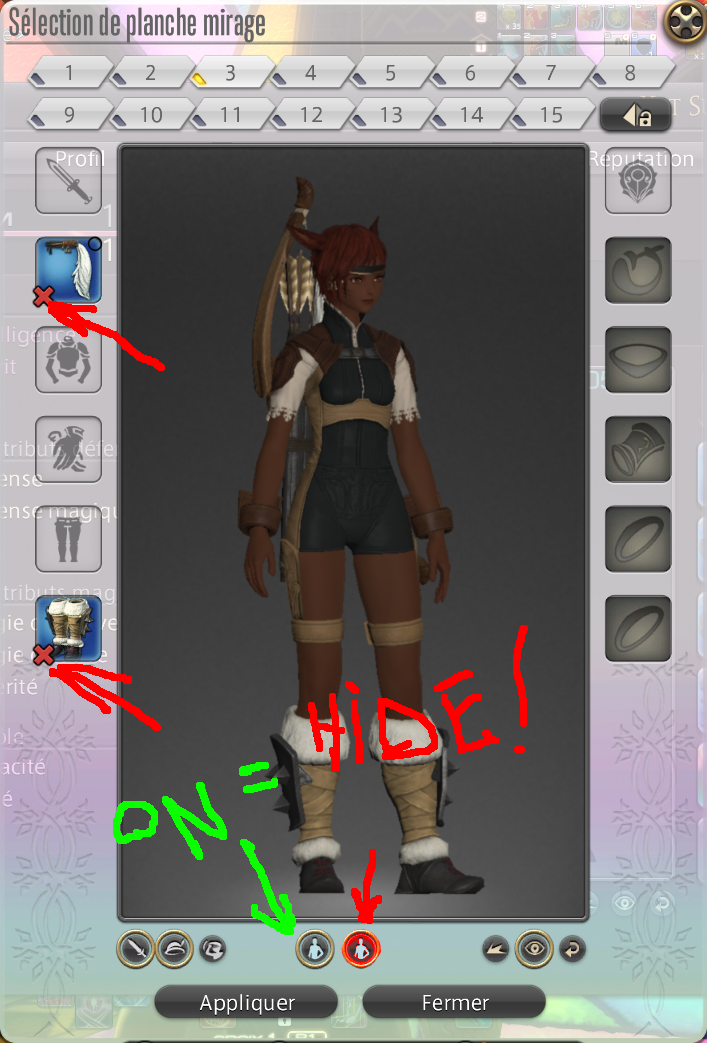
Hi, The cosplay machine tells us what we CANNOT apply on our current clothes: the red cross indicators. But... It doesn't show us what will happen if we apply that cosplay card!
Can we have a way to see what we will look like when we apply a cosplay? Pleeeeeeeeeeeeeeease?
Can be an extra button we activate, that would show us not what the glamour card looks on us but what we will look like after it as successfully glamoured what could be.
And, even better, we can apply other classes/jobs stuff, whatever our current classes/jobs allow us to wear, and the cosplay machine shows all that? (support the original idea! https://forum.square-enix.com/ffxiv/...lam-it-Play-it!)
-
08-27-2021 03:08 AM #1Player
- Join Date
- Aug 2013
- Posts
- 1,644
- Character
- Yot Suffy
- World
- Odin
- Main Class
- Bard Lv 90
Glamour cosplay machine improvement
(4)Steady 60fps everywhere? Post your CPU/GPU/Limit!
1080p60 cheap pc build
https://forum.square-enix.com/ffxiv/threads/308449-1080p60-cheap-pc-build?p=5146847&viewfull=1#post5146847

-
08-27-2021 03:20 AM #2Player
- Join Date
- Nov 2017
- Posts
- 14,291
- Character
- Aurelie Moonsong
- World
- Bismarck
- Main Class
- Red Mage Lv 100
I really can't understand what you are trying to ask for. Even with the diagram.
It is already showing you the picture in the preview window. That (or the piece-by-piece trying on while Save Outfit is active) the only way you can see your character in that incompatible combination.
If you've got those Xs showing, the plate is incompatible with your gear and there is no further step in which you can preview it without actually applying it. If you apply it, nothing will happen.
If some bits are compatible and some aren't, you've probably built your plate wrong.
If you just want to try on pieces, even if you can't ever equip them together, that's what the Save Outfit button on the "try on" window is for.(0)
-
08-27-2021 03:52 AM #3Player
- Join Date
- Aug 2013
- Posts
- 1,644
- Character
- Yot Suffy
- World
- Odin
- Main Class
- Bard Lv 90
Mmmhhhhh...
 Originally Posted by Iscah

The idea is " I can't wear? Don't show it!"
The set I am presenting is completely incompatible with my current job. The red crosses tell me what won't inprint but not what I will look like AFTER I inprint.
When we look at a cosplay set, it shows us all the clothes and how they look like together. It is excellent but forget the fact some items... you can't wear.
We can make cosplay sets, we can try them, but we can't see what our current job will allow us to inprint. The option to see what the RESULT of the inprint will look like is what I ask for. After all, we can make sets and try them regardless of the job or current equipment we have.
(0)Steady 60fps everywhere? Post your CPU/GPU/Limit!
After all, we can make sets and try them regardless of the job or current equipment we have.
(0)Steady 60fps everywhere? Post your CPU/GPU/Limit!
1080p60 cheap pc build
https://forum.square-enix.com/ffxiv/threads/308449-1080p60-cheap-pc-build?p=5146847&viewfull=1#post5146847
-
08-27-2021 01:15 PM #4Player
- Join Date
- Nov 2017
- Posts
- 14,291
- Character
- Aurelie Moonsong
- World
- Bismarck
- Main Class
- Red Mage Lv 100
The glamour plate menu is for viewing the contents of your plates.
Originally Posted by yotsuffy
Either the outfit is designed for your current job or it is for something else.
If it's showing Xs, you can't apply it. "What it will look like after you imprint" is exactly what you look like now. They don't need to rebuild their system to show you that.
And it's an inherent waste of a plate to put a striking headband and warrior boots on it anyway. Nothing will ever be compatible with both those pieces so you'll never find something you can use it on.(3)Last edited by Iscah; 08-27-2021 at 01:57 PM. Reason: Typo
-
08-27-2021 08:56 PM #5Player
- Join Date
- Aug 2013
- Posts
- 1,644
- Character
- Yot Suffy
- World
- Odin
- Main Class
- Bard Lv 90
I Agree.
Originally Posted by Iscah
I request additional feature.
I Agree.
Originally Posted by Iscah
Hence the request from Tsiron.
1) I Agree.
Originally Posted by Iscah
2) I Disagree.
If the plate has parts that can imprint and parts that can't imprint, it still shows me all its parts.
Also, some clothing appearances are altered by the clothes you wear around so it can look differently on the plate and after imprint because there'll be different clothes around.
3) I Disagree.
Hence my request. And previous point.
1) I Disagree.
Originally Posted by Iscah
To this day, you can find useful to use a plate showing different jobs clothes.
- You can save it for the day it would be possible.
- You can use it to save other plates when you only want to imprint parts for different jobs and can gather them. Say a weapon for a job, a chest for another, etc.
2) I Disagree.
Unless you are part of the team that decides and works on this game you can't say anything about future features.
However, as players, we all have ideas of what we'd like to see improved/changed/added. Hence the request from Tsiron. Hence my request.(0)Steady 60fps everywhere? Post your CPU/GPU/Limit!
1080p60 cheap pc build
https://forum.square-enix.com/ffxiv/threads/308449-1080p60-cheap-pc-build?p=5146847&viewfull=1#post5146847
-
08-27-2021 09:23 PM #6Player
- Join Date
- Aug 2020
- Posts
- 2,405
- Character
- Lorelai Oshidari
- World
- Maduin
- Main Class
- Dancer Lv 100
Just being honest, I highly doubt we'll ever see a change to the glamour system as it's already a whole mess in itself. People have been asking for changes for years and they're still not implemented just because of how the system was originally put into the game.
Also, the dev team has a pretty firm stance on not making glamour that belongs to certain classes be wearable by others. They like having the separation and are pretty rigid on the design of gear as well (hence why casters 99% of the time will have glamour based around robes, capes, dresses, long skirts, etc.)(0)Last edited by LianaThorne; 08-27-2021 at 09:27 PM.
-
08-27-2021 10:13 PM #7Player
- Join Date
- Aug 2013
- Posts
- 1,644
- Character
- Yot Suffy
- World
- Odin
- Main Class
- Bard Lv 90
I see a difference between a game that is published and is not intended to evolve and a game that is constantly evolving.
Originally Posted by LianaThorne
The first one, if it doesn't suit me, I don't play it. I watch it day one and consider it released as the developers intended. The faults that I find in it are not for the developers and I have nothing better to hope for. (Cyberpunk 2077 et al.)
The second:
- if I don't pay a subscription (Genshin Impact et al.), I don't expect anything from it. I accept the flaws that I find in it or I don't play it.
- if I pay a subscription, I intend to have the right to express an opinion. If this opinion is expressed by a lot of players, then I expect it to be heard.
If I were to think that an opinion expressed by a lot of players about a constantly evolving game they pay a subscription for is not to be heard, then I consider this game like the first one. Developers have a vision for it; if I don't like it, I shut up and don't play it.
No drama.(1)Steady 60fps everywhere? Post your CPU/GPU/Limit!
1080p60 cheap pc build
https://forum.square-enix.com/ffxiv/threads/308449-1080p60-cheap-pc-build?p=5146847&viewfull=1#post5146847
-
08-27-2021 10:38 PM #8Player
- Join Date
- Feb 2015
- Posts
- 2,680
- Character
- Dal S'ta
- World
- Gilgamesh
- Main Class
- Bard Lv 100
To be fair, this is not just a PC game, nor is it just a Console game. It's both, which is pretty unique in the world of gaming. Unique because, unlike Call of Duty, for example, both PC and Console players can play together. There will, as a result, be some things that can change easily, some things that can change at a relatively high cost, and some things that cannot change at all.
Originally Posted by yotsuffy
Expectations of what should be possible, from the player's point-of-view, may be taken into account. They may be ignored. At no point in time are the developer's going to say "That's a good idea!" publicly, because, well, then you will expect to see it in game, in short order, when it may not even be possible.
The customer is not always right when it comes to game coding. Fix bugs - got it. Change how a system works based on customer demands - not always going to happen, nor should it.
You've spoken your piece. If it was a suggestion, do not feel upset if it never sees the light of day. You have no idea of the resources that would be required, nor if it is even possible to code that way.
If it was a demand, well. Be prepared to be disappointed and act accordingly.(0)
-
08-27-2021 10:44 PM #9Player

- Join Date
- Aug 2021
- Posts
- 639
- Character
- Katja Eruyt
- World
- Moogle
- Main Class
- White Mage Lv 90
I love suggestions like these, I'd like to think ideas such as this opens doors and gives S.E an opportunity to do some brainstorming in order to improve the game in future.
(1)
-
08-27-2021 10:56 PM #10Player
- Join Date
- Aug 2013
- Posts
- 1,644
- Character
- Yot Suffy
- World
- Odin
- Main Class
- Bard Lv 90
Your point is completely valid.
Originally Posted by DPZ2
I started on PS3. Bought A PS4 to get a better exerience of the game. Changed my hard drive for an SSD to kill loading times that cancelled party finder pop up windows. Then tried PS4 Pro.
Stormblood killed the remaining fun. I left.
Got a PC, came back for Shadowbringers.
I know there are things I can't change. I know what I can accept or endure. And I know it is JUST a game. No drama.(0)Steady 60fps everywhere? Post your CPU/GPU/Limit!
1080p60 cheap pc build
https://forum.square-enix.com/ffxiv/threads/308449-1080p60-cheap-pc-build?p=5146847&viewfull=1#post5146847
 Reply With Quote




