



What if it was like some third party fan-site? Couldn't they set up their website to save and view passwords that users submit?
-
05-11-2018 09:17 AM #31Player

- Join Date
- Aug 2013
- Posts
- 527
- Character
- Naus Prime
- World
- Mateus
- Main Class
- Bard Lv 90
(0)
-
05-11-2018 10:18 AM #32Player

- Join Date
- Jun 2017
- Location
- The Goblet
- Posts
- 1,510
- Character
- Cecelia Stormfeather
- World
- Cactuar
- Main Class
- White Mage Lv 90
They could. I mean, technically a major company like Blizzard could too. But they wouldn't because it's grossly illegal and as a business a really poor idea.
 Originally Posted by JackHatchet

Some random website can absolutely do it. Which is another reason why password reuse is bad.(1)Survivor of Housing Savage 2018.
Discord: Tridus#2642
-
05-11-2018 10:21 AM #33Player

- Join Date
- Sep 2017
- Location
- Ul'Dah
- Posts
- 1,091
- Character
- Nephthys Yamada
- World
- Adamantoise
- Main Class
- White Mage Lv 80
As an industry standard...all major companies store passwords in a hash/salt/encryption type format.
Originally Posted by JackHatchet
Its considered a major violation of PII (Personally Identifiable Information) Standards and accreditation to not follow these especially if said service is handling transactions.
Companies are not going to open themselves to lawsuits for pleasure or "gaming" to compare passwords.
And before you ask what it is....I suggest you learn to google.
Everything you've asked is easily found with just a bit of reading. There's no reason to derail this thread from the main point.
I've seen your posts before..and I get the distinct distaste of troll bait every time.
Bottom line:
People need to take better care of their accounts to avoid loss and harm to themselves.(2)Last edited by NephthysVasudan; 05-11-2018 at 10:31 AM.
-
05-11-2018 04:21 PM #34Player

- Join Date
- Sep 2013
- Location
- Gridania
- Posts
- 2,776
- Character
- Kisa Kisa
- World
- Excalibur
- Main Class
- White Mage Lv 100
The length and the type of characters are two different practices. Originally Posted by Sigma-Astra
If you are trying to prevent brute-force password cracking (eg a site gets hacked and their password hashes are downloaded) then all the cracker needs is time to crack a password, and in the case of Unix crypt, most systems only generate the password from the first 8 characters. So if you create a 32 character password, the hash only needs the first 8 characters, because really, the password is only the first 8 characters. So if you only have 8 characters of entropy, adding symbols, numbers and mixed-cased letters increases the entropy.
However most websites make arbitrary requirements like upper and lower case, at least one number and symbol and in fact lower the entropy by doing so. So instead of someone having a 32 character password phrase, they are forced to remember where they put those numbers and symbols, so to make the password checker happy you put those at the beginning or end.
Now, preventing password reuse is an easily solved problem, you keep the old hashes (but increase the data breech risk,) so the user doesn't keep switching between two favored passwords. However password-reuse between different sites is not easily solved, and in fact the bad actors made it easy to prevent these passwords from being used. https://haveibeenpwned.com/ will tell you which sites you have accounts with that have had data breeches. If a site has it's user/password hashes stolen, there is another concept called "rainbow tables" that can be used against non-salted or poorly-salted password hashes. By current estimates ANY 9 character password can be cracked in 4 days. https://www.betterbuys.com/estimatin...racking-times/ . So by current times, you only need a 12 character password, regardless of symbols, letters or numbers, it would still take 200 years to crack with a single PC. However current botnets could reduce this time significantly if an important target (eg celebrities, politicians, billionaires) is the target.
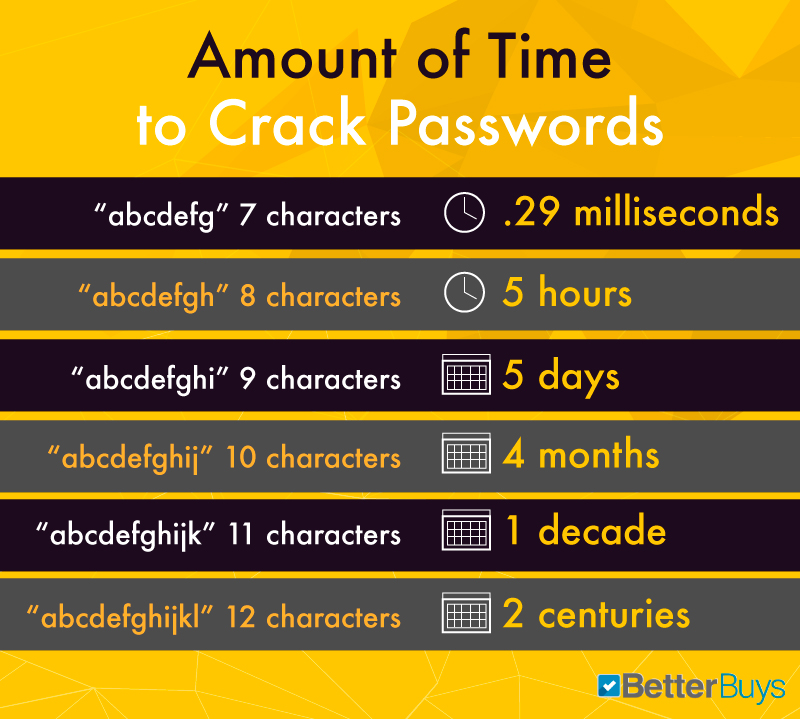
But it also needs to be said that tools like lastpass/keeppass are solutions created because of crappy password rules enforcement, thus instead of the user creating passwords they can remember, they're forced to create passwords they will never know. It would make more sense to require users to create passwords that are minimally 12 characters in length, and to which one could easily "pad" their favorite reused password out to hit the entropy requirement (eg say your password was "ffxiv" 5 characters is way too low, you can pad it to "ilovetoplayffxiv", which is 16 characters, rather than trying to make "ffXIV14*" to meet the requirements, but the entropy is too low. That 8 character password can be cracked in 5-10 hours, over the 16 character password which would take 91 millennia.
As an example using the Apple password manager, I created an account for my parents when they drove through a toll plaza, as we were going through it. The iphone created a password at that time and I didn't write it down. So when my dad asked for it, I was able to pull it off... the iMac. Because the passwords on the device have to be decryptable, anyone who has access to the machine can see your passwords. So if you use password managers, don't share your computer, store the encrpyted password file on a USB stick or on the cell phone memory that is only visible after being unlocked.
The reason "cloud" password managers are bad, has more to do with relying on third parties to stay in business and not be blocked in certain countries. If you're crossing the border (eg into or out of the US as an example) you want to make sure that anyone who inspects the device can not simply turn on the WiFi and access your cloud services if you're forced to unlock it. Hence my comment about not saving banking or your email passwords on the device.(0)Last edited by KisaiTenshi; 05-11-2018 at 04:28 PM.
-
05-11-2018 04:35 PM #35Player
- Join Date
- Mar 2017
- Location
- Ul'dah
- Posts
- 1,085
- Character
- Soma Kagami
- World
- Sargatanas
- Main Class
- Black Mage Lv 90
I'm just stating what someone working in the field actually suggests as opposed to what other people sensationalize on media and news websites. I'd trust his judgment first over what other places will naysay usually. He suggested both methods as the four random words isn't enough nowadays in terms of security.
And really, it's a personal user error and problem if one cannot remember their own passwords. The idea is to make them harder to crack and vague to those around you, but not so impossible that you yourself can't remember it. Usually through repeated repetition of typing it in constantly, a person can remember it enough times if it's used.(0)
-
05-11-2018 05:43 PM #36Player

- Join Date
- Mar 2015
- Location
- Finland
- Posts
- 4,072
- Character
- Reinha Sorrowmoon
- World
- Odin
- Main Class
- Reaper Lv 100
I just write every password onto a piece of paper. Can't hack a physical item, and in the unlikely event where someone breaks into your house there are more important things to lose than game and forum passwords. The one thing people should not write down anywhere is their bank login info.
Originally Posted by Tridus
(0)Graphics
MSQ
Viper
-
05-11-2018 05:45 PM #37Player
- Join Date
- Sep 2013
- Location
- Gridania
- Posts
- 2,776
- Character
- Kisa Kisa
- World
- Excalibur
- Main Class
- White Mage Lv 100
When I worked for the wireless company I had to keep 14 passwords, of which half the systems had different rules, and at least two of them maxed out at 8 characters. So at the time I stored those passwords in a iPaq (greyscale compaq PDA, which is erased when the battery dies.) One of the people in my call center rigged a script to use the default assigned passwords to do something rather large scale, and my account was one of the ones that had changed the default, and was probably the only one. Most security problems come from people you know, not bogeyman on the internet.
Originally Posted by Sigma-Astra
In a business environment, the password rules are often arbitrarily set, but then you have people just putting the passwords on sticky notes and leaving them near the PC anyway. So that defeats the entire purpose, as it's going to be the maintenance dude or the crappy coworker who wants to prank you (and yes that happens a lot. A thing that happened a lot was that if you left your PC unlocked, someone would email from your PC to your supervisor with "I'm a naughty person who leaves their computer unlocked".)(1)Last edited by KisaiTenshi; 05-11-2018 at 05:48 PM.
-
05-11-2018 07:37 PM #38Player
- Join Date
- Jun 2017
- Location
- The Goblet
- Posts
- 1,510
- Character
- Cecelia Stormfeather
- World
- Cactuar
- Main Class
- White Mage Lv 90
I have ~60 passwords at work for various things and over 200 at home, so that's not practical in all kinds of ways.
Originally Posted by Reinha
Yup, although we do it by sending out emails saying "I'm bringing Tim Hortons tomorrow for everyone!"
Originally Posted by KisaiTenshi
Very few people make that mistake twice.(0)Survivor of Housing Savage 2018.
Discord: Tridus#2642
-
05-11-2018 07:55 PM #39Player
- Join Date
- Mar 2015
- Location
- Finland
- Posts
- 4,072
- Character
- Reinha Sorrowmoon
- World
- Odin
- Main Class
- Reaper Lv 100
I have around 80 and it all fits onto one A4 sized sheet. Don't you still have to individually add every password in the password manager? The autofill option is quite practical but it seems more secure not having any passwords saved in digital form.
Originally Posted by Tridus
(0)Graphics
MSQ
Viper
-
05-11-2018 09:55 PM #40Player
- Join Date
- Jun 2017
- Location
- The Goblet
- Posts
- 1,510
- Character
- Cecelia Stormfeather
- World
- Cactuar
- Main Class
- White Mage Lv 90
Do you take it with you when you travel? That's not at all practical when I'm on vacation and get a call from work about a critical problem that requires one of those admin passwords, because I'm not keen on driving back home to get the password, and I'm really not keen on carrying a list of them in paper form because god help me if I misplace it. My phone at least requires a PIN to access and I can activate a remote wipe if it goes missing.
Originally Posted by Reinha
Typically, they work by picking up when you login to a site via a browser extension, and offer to save the credentials you just used (since a browser extension can know that, which is why you shoudn't just install any random old extension). When you create an account, it offers to create the password for you and will save that. You can add stuff manually, but that's not the primary means of adding sites.Don't you still have to individually add every password in the password manager?
The work one requires more manual intervention, but it's meant for a higher opsec environment and thus doesn't work the same way.
Security is all about what it is you want to protect, how important it is, and how much effort you're willing to put into protecting it. That last part gets ignored by a lot of security advice, which is why it fails so often. Password managers make good passwords far, far easier to use by automating a lot of it and making it accessable. You take on a different risk by using one, but that risk is significantly less than doing what people usually do without one: have bad password practices.The autofill option is quite practical but it seems more secure not having any passwords saved in digital form.
If writing them down works for you, great! There's no single correct answer on security questions like this, as your ability to follow the system and your comfort level matter.
I need them on multiple devices in multiple locations, so for me that's going to be an overly difficult option to use and that'll result in problems. Thus, for me, the overall security level with Lastpass is higher than without it. A couple of critical things aren't in it (primary email for account recovery, online banking) because for those ones I don't think the gain is worth the potential risk. But my reddit password? I don't want to have to put effort into managing that, it's not important enough.
For someone like my dad, he's bad with passwords. He'd use the same one for everything, and if he couldn't, he'd write another one down and then lose it. Gave him a password manager and once he learned how to use it, the problem went away. The result was he now has better passwords and doesn't stress about having to remember them.
It's really all about what tradeoffs you are willing to make to get the security level you need, with a system you'll actually follow consistently. If your opsec requirements are higher than what a cloud password manager gives you, then you shouldn't use one (I know some people who use tools like Keepass for that reason instead, as it's a very high security password manager that can run in local only mode). For the average home user, that often isn't the case, and we can really boost their account security with one by having it eliminate their need to remember passwords (thus eliminating both bad passwords and password reuse on multiple sites).(1)Last edited by Tridus; 05-11-2018 at 09:59 PM.
Survivor of Housing Savage 2018.
Discord: Tridus#2642
 Reply With Quote


