


Hello,
I've been receiving the listed error a bit too frequently lately on my gaming desktop. This has cropped up in the middle of certain Duty Roulette fights, if I'm not even doing anything in certain areas, and even in the pic I've posted in Ul'Dah looking at the marketboard.
I do play with DirectX 11, in 1440p, and my computer does go above and beyond the minimum system requirements. I've never had any trouble with the game erroring out like this and then crashing out. My tower is a bit newer also but most games have not crashed out like FF14 has been.
What I've tried doing:
-Disabled all overlays. I do use the discord overlay but I've usually been playing with no programs running in the background too much.
-Did a clean install to the latest graphics card driver
-Checked that FF14 is running as an admin
-Checked other software and Windows is up to date.
-Ran a RAM/Memtest which everything passed (Before I've had issues with MMOs because the RAM went bad)
-Uninstalled, reinstalled the game
-Checked in the BIOS if XMP is enabled but I don't even have the option to use that
I'm just getting to the point where I've done a lot and nothing is really working. I did also google past reports of this error where people said it could be something with G-Sync and FF14 not playing well?? But these were from many years ago. Should I also try disabling that?
I did also check event viewer every time FF14 crashed and kept on seeing the error in the other screenshot. I don't know if it's related or anything and I'm not so familiar with event viewer in general but it's a pattern I've been noticing.
I also do want to note that I have play on an Asus gaming laptop that has a RTX 3700 TI. On my laptop I don't receive this DirectX error, so seems isolated to my gaming desktop.
I can also actually open the case to adjust the hardware if it would need to be reseated, it's a custom build. Just may be a bit tricky because it's a bit heavy lol
Any help would be majorly appreciated, thanks!
Sorry I'll upload the images when I can. Can't seem to upload them directly to the post right now.
https://i.imgur.com/UmRrE79.png
https://i.imgur.com/zBmtKFR.png
-=-=-=-=-=-=- FFXIV Information -=-=-=-=-=-=-
MyDocument C:\Users\muses\OneDrive\Documents
FINAL FANTASY XIV ONLINE C:\Program Files (x86)\SquareEnix
FINAL FANTASY XIV - A Realm Reborn Language 1 Region 2
ProxyEnable 0
ProxyServer unspecified
ProxyOverride unspecified
-=-=-=-=-=-=- System Information -=-=-=-=-=-=-
SYSTEM_OS Windows 11 Pro 64-bit (6.2, Build 9200) (22621.ni_release.220506-1250)
SYSTEM_CPU 13th Gen Intel(R) Core(TM) i9-13900K (32 CPUs), ~3.0GHz
SYSTEM_CORE_NUM SYSTEM_CORE_LOGIC 32 SYSTEM_CORE_PHYSICS 24
SYSTEM_BIOS 0813
SYSTEM_LANGUAGE English (Regional Setting: English)
SYSTEM_MEMORY 32508.801MB
SYSTEM_VIRTUAL_MEMORY 2047.875MB
SYSTEM_PAGE_FILE 34556.801MB
SYSTEM_STORAGE C:\ SYSTEM_HARDDISK_DRIVE SYSTEM_TOTALDISC_SPACE 1862.902GB SYSTEM_FREEDISC_SPACE 1401.213GB
SYSTEM_STORAGE G:\ SYSTEM_HARDDISK_DRIVE SYSTEM_TOTALDISC_SPACE 1863.000GB SYSTEM_FREEDISC_SPACE 1325.976GB
SYSTEM_DIRECTX_VERSION DirectX 12
SYSTEM_GRAPHICS NVIDIA GeForce RTX 4090
SYSTEM_GRAPHICS_DEVICE \\.\DISPLAY1
SYSTEM_GRAPHICS_CHIP NVIDIA GeForce RTX 4090
SYSTEM_GRAPHICS_MAKER NVIDIA
SYSTEM_GRAPHICS_VRAM 3072.000 MB
SYSTEM_GRAPHICS_SHARED_VRAM 1023.938 MB
SYSTEM_GRAPHICS_DAC Integrated RAMDAC
SYSTEM_GRAPHICS_DISPLAY_MODE 2560 x 1440 (32 bit) (144Hz)
SYSTEM_GRAPHICS_DRIVER C:\Windows\System32\DriverStore\FileRepository\nvmdig.inf_amd64_ed9d96ac28b0f507\nvldumdx.dll,C:\Windows\System32\DriverStore\FileRepository\nvmdig.inf_amd64_ed9d96ac28b0f507\nvldumdx.dll,C:\Windows\System32\DriverStore\FileRepository\nvmdig.inf_amd64_ed9d96ac28b0f507\nvldumdx.dll,C:\Windows\System32\DriverStore\FileRepository\nvmdig.inf_amd64_ed9d96ac28b0f507\nvldumdx.dll
SYSTEM_GRAPHICS_DRIVER_VERSION 31.00.0015.4633
SYSTEM_GRAPHICS_DRIVER_DATE 12/5/2023 18:00:00
SYSTEM_GRAPHICS_DRIVER_LANGUAGE English
3.0
SYSTEM_GRAPHICS_PIXEL_SHADER 3.0
SYSTEM_GRAPHICS_VERTEX_TEXTURE SYSTEM_SUPPORT
SYSTEM_SOUND Headphones (WH-1000XM5)
SYSTEM_SOUND_DEVICE_ID {E0361707-C041-4815-B54A-5847DD9247EE}
SYSTEM_SOUND_DEVICE_NAME BthA2dp.sys
SYSTEM_SOUND_DRIVER_VERSION 10.0.22621.1
SYSTEM_SOUND_DRIVER_LANGUAGE
SYSTEM_SOUND_DRIVER_DATE 5/5/2022 18:00:00
SYSTEM_SOUND Realtek Digital Output (Realtek USB Audio)
SYSTEM_SOUND_DEVICE_ID {C98E4362-B5FB-489F-924B-F5CEC73DDCA1}
SYSTEM_SOUND_DEVICE_NAME RtUsbA64.sys
SYSTEM_SOUND_DRIVER_VERSION 6.3.9600.2342
SYSTEM_SOUND_DRIVER_LANGUAGE English
SYSTEM_SOUND_DRIVER_DATE 9/14/2022 18:00:00
SYSTEM_SOUND Speakers (Sonic Studio Virtual Mixer)
SYSTEM_SOUND_DEVICE_ID {20803BE4-7AC5-4D00-818B-EB730348F0A2}
SYSTEM_SOUND_DEVICE_NAME RtUsbA64.sys
SYSTEM_SOUND_DRIVER_VERSION 1.0.2.0
SYSTEM_SOUND_DRIVER_LANGUAGE English
SYSTEM_SOUND_DRIVER_DATE 10/13/2021 18:00:00
SYSTEM_INPUT {6F1D2B60-D5A0-11CF-BFC7444553540000}
SYSTEM_INPUT_NAME Mouse
SYSTEM_INPUT_REMARKS SYSTEM_GAMEPAD_AXIS 3 SYSTEM_GAMEPAD_BUTTON 5 SYSTEM_GAMEPAD_FOV 0
SYSTEM_INPUT {6F1D2B61-D5A0-11CF-BFC7444553540000}
SYSTEM_INPUT_NAME Keyboard
SYSTEM_INPUT_REMARKS SYSTEM_GAMEPAD_AXIS 0 SYSTEM_GAMEPAD_BUTTON 128 SYSTEM_GAMEPAD_FOV 0
SYSTEM_INPUT {9217F190-BA0C-11ED-8003444553540000}
SYSTEM_INPUT_NAME Razer Naga Pro
SYSTEM_INPUT_REMARKS SYSTEM_GAMEPAD_AXIS 0 SYSTEM_GAMEPAD_BUTTON 3 SYSTEM_GAMEPAD_FOV 0
SYSTEM_INPUT {9217F190-BA0C-11ED-8004444553540000}
SYSTEM_INPUT_NAME AURA LED Controller
SYSTEM_INPUT_REMARKS SYSTEM_GAMEPAD_AXIS 0 SYSTEM_GAMEPAD_BUTTON 0 SYSTEM_GAMEPAD_FOV 0
SYSTEM_INPUT {9217CA80-BA0C-11ED-8002444553540000}
SYSTEM_INPUT_NAME DSV2 Pro
SYSTEM_INPUT_REMARKS SYSTEM_GAMEPAD_AXIS 0 SYSTEM_GAMEPAD_BUTTON 8 SYSTEM_GAMEPAD_FOV 0
SYSTEM_INPUT {30552B30-F373-11ED-8001444553540000}
SYSTEM_INPUT_NAME Razer Base Station Chroma
SYSTEM_INPUT_REMARKS SYSTEM_GAMEPAD_AXIS 0 SYSTEM_GAMEPAD_BUTTON 573 SYSTEM_GAMEPAD_FOV 0
SYSTEM_INPUT {921818A0-BA0C-11ED-8005444553540000}
SYSTEM_INPUT_NAME Razer Naga Pro
SYSTEM_INPUT_REMARKS SYSTEM_GAMEPAD_AXIS 0 SYSTEM_GAMEPAD_BUTTON 1 SYSTEM_GAMEPAD_FOV 0
SYSTEM_INPUT {921818A0-BA0C-11ED-8008444553540000}
SYSTEM_INPUT_NAME HID-compliant consumer control device
SYSTEM_INPUT_REMARKS SYSTEM_GAMEPAD_AXIS 0 SYSTEM_GAMEPAD_BUTTON 1024 SYSTEM_GAMEPAD_FOV 0
SYSTEM_INPUT {92183FB0-BA0C-11ED-800A444553540000}
SYSTEM_INPUT_NAME HID-compliant consumer control device
SYSTEM_INPUT_REMARKS SYSTEM_GAMEPAD_AXIS 0 SYSTEM_GAMEPAD_BUTTON 3 SYSTEM_GAMEPAD_FOV 0
SYSTEM_INPUT {921818A0-BA0C-11ED-8006444553540000}
SYSTEM_INPUT_NAME DSV2 Pro
SYSTEM_INPUT_REMARKS SYSTEM_GAMEPAD_AXIS 0 SYSTEM_GAMEPAD_BUTTON 0 SYSTEM_GAMEPAD_FOV 0
SYSTEM_INPUT {921818A0-BA0C-11ED-8007444553540000}
SYSTEM_INPUT_NAME HID-compliant consumer control device
SYSTEM_INPUT_REMARKS SYSTEM_GAMEPAD_AXIS 0 SYSTEM_GAMEPAD_BUTTON 1024 SYSTEM_GAMEPAD_FOV 0
SYSTEM_INPUT {3055A060-F373-11ED-8002444553540000}
SYSTEM_INPUT_NAME Razer Base Station Chroma
SYSTEM_INPUT_REMARKS SYSTEM_GAMEPAD_AXIS 0 SYSTEM_GAMEPAD_BUTTON 3 SYSTEM_GAMEPAD_FOV 0
SYSTEM_INPUT {92183FB0-BA0C-11ED-800D444553540000}
SYSTEM_INPUT_NAME Razer Naga Pro
SYSTEM_INPUT_REMARKS SYSTEM_GAMEPAD_AXIS 0 SYSTEM_GAMEPAD_BUTTON 1 SYSTEM_GAMEPAD_FOV 0
SYSTEM_INPUT {921818A0-BA0C-11ED-8009444553540000}
SYSTEM_INPUT_NAME HID-compliant consumer control device
SYSTEM_INPUT_REMARKS SYSTEM_GAMEPAD_AXIS 0 SYSTEM_GAMEPAD_BUTTON 3 SYSTEM_GAMEPAD_FOV 0
SYSTEM_INPUT {92183FB0-BA0C-11ED-800C444553540000}
SYSTEM_INPUT_NAME USB Input Device
SYSTEM_INPUT_REMARKS SYSTEM_GAMEPAD_AXIS 0 SYSTEM_GAMEPAD_BUTTON 573 SYSTEM_GAMEPAD_FOV 0
SYSTEM_INPUT {3055EE80-F373-11ED-8003444553540000}
SYSTEM_INPUT_NAME Razer Base Station Chroma
SYSTEM_INPUT_REMARKS SYSTEM_GAMEPAD_AXIS 0 SYSTEM_GAMEPAD_BUTTON 1 SYSTEM_GAMEPAD_FOV 0
SYSTEM_INPUT {921866C0-BA0C-11ED-8011444553540000}
SYSTEM_INPUT_NAME USB Input Device
SYSTEM_INPUT_REMARKS SYSTEM_GAMEPAD_AXIS 0 SYSTEM_GAMEPAD_BUTTON 3 SYSTEM_GAMEPAD_FOV 0
SYSTEM_INPUT {92183FB0-BA0C-11ED-800B444553540000}
SYSTEM_INPUT_NAME CORSAIR iCUE COMMANDER CORE XT
SYSTEM_INPUT_REMARKS SYSTEM_GAMEPAD_AXIS 0 SYSTEM_GAMEPAD_BUTTON 0 SYSTEM_GAMEPAD_FOV 0
SYSTEM_INPUT {92188DD0-BA0C-11ED-8014444553540000}
SYSTEM_INPUT_NAME USB Input Device
SYSTEM_INPUT_REMARKS SYSTEM_GAMEPAD_AXIS 0 SYSTEM_GAMEPAD_BUTTON 1 SYSTEM_GAMEPAD_FOV 0
SYSTEM_INPUT {92188DD0-BA0C-11ED-8016444553540000}
SYSTEM_INPUT_NAME USB Input Device
SYSTEM_INPUT_REMARKS SYSTEM_GAMEPAD_AXIS 0 SYSTEM_GAMEPAD_BUTTON 1 SYSTEM_GAMEPAD_FOV 0
SYSTEM_INPUT {921866C0-BA0C-11ED-800F444553540000}
SYSTEM_INPUT_NAME CORSAIR iCUE COMMANDER Core
SYSTEM_INPUT_REMARKS SYSTEM_GAMEPAD_AXIS 0 SYSTEM_GAMEPAD_BUTTON 0 SYSTEM_GAMEPAD_FOV 0
SYSTEM_INPUT {921866C0-BA0C-11ED-8012444553540000}
SYSTEM_INPUT_NAME USB Audio
SYSTEM_INPUT_REMARKS SYSTEM_GAMEPAD_AXIS 0 SYSTEM_GAMEPAD_BUTTON 0 SYSTEM_GAMEPAD_FOV 0
SYSTEM_INPUT {921866C0-BA0C-11ED-8013444553540000}
SYSTEM_INPUT_NAME CORSAIR iCUE COMMANDER CORE XT
SYSTEM_INPUT_REMARKS SYSTEM_GAMEPAD_AXIS 0 SYSTEM_GAMEPAD_BUTTON 0 SYSTEM_GAMEPAD_FOV 0
SYSTEM_INPUT {30563CA0-F373-11ED-8004444553540000}
SYSTEM_INPUT_NAME Razer Base Station Chroma
SYSTEM_INPUT_REMARKS SYSTEM_GAMEPAD_AXIS 0 SYSTEM_GAMEPAD_BUTTON 1 SYSTEM_GAMEPAD_FOV 0
SYSTEM_INPUT {92188DD0-BA0C-11ED-8015444553540000}
SYSTEM_INPUT_NAME CORSAIR iCUE COMMANDER Core
SYSTEM_INPUT_REMARKS SYSTEM_GAMEPAD_AXIS 0 SYSTEM_GAMEPAD_BUTTON 0 SYSTEM_GAMEPAD_FOV 0
SYSTEM_INPUT {92183FB0-BA0C-11ED-800E444553540000}
SYSTEM_INPUT_NAME Razer Naga Pro
SYSTEM_INPUT_REMARKS SYSTEM_GAMEPAD_AXIS 0 SYSTEM_GAMEPAD_BUTTON 573 SYSTEM_GAMEPAD_FOV 0
-=-=-=-=-=-=- Application Information -=-=-=-=-=-=-
Axalta Remote - 10.69.56.33 - Remote Desktop Connection
ARMOURY CRATE
Settings
Pulse Secure
Windows Input Experience
For ff14 directx11 error
Settings
-=-=-=-=-=-=- Install Information -=-=-=-=-=-=-
MSI Afterburner 4.6.5
Battle.net
Burning Crusade Classic
Diablo II Resurrected
Diablo III
Diablo IV
Entropia Universe
Google Chrome
Microsoft Edge
Microsoft Edge Update
Microsoft Edge WebView2 Runtime
Pulse Secure 9.1
Pulse Secure Setup Client Activex Control
Razer Cortex
Razer Synapse
RivaTuner Statistics Server 7.3.4
Steam
World of Warcraft
GameSDK Service
Microsoft Visual C++ 2013 Redistributable (x64) - 12.0.30501
ASUS Ambient HAL
Realtek USB Audio
AsusFCNotification
Microsoft Visual C++ 2012 Redistributable (x64) - 11.0.50727
Patriot Viper DRAM RGB
AURA lighting effect add-on
Microsoft Visual C++ 2008 Redistributable - x86 9.0.30729.4148
ENE RGB HAL
AsusFCNotification
Microsoft .NET Runtime - 6.0.16 (x64)
FINAL FANTASY XIV ONLINE
ROG FAN XPERT 4
ASUS Framework Service
Microsoft Visual C++ 2012 Redistributable (x86) - 11.0.61030
Intel(R) Chipset Device Software
Microsoft Visual C++ 2015-2022 Redistributable (x86) - 14.36.32532
The Sims™ 4
ASUS AURA Extension Card HAL
Dragon Age™ II
PHISON HAL
AURA Service
THX Spatial Audio USB 1532-0521
AURA DRAM Component
THX V3 APO Presets
Patriot Viper M2 SSD RGB
GameSDK Service
Microsoft Visual C++ 2005 Redistributable
Teams Machine-Wide Installer
Microsoft Visual C++ 2022 X86 Minimum Runtime - 14.36.32532
ENE_EHD_M2_HAL
THX V3 APO Presets
Microsoft Visual C++ 2013 x86 Minimum Runtime - 12.0.40664
Universal Holtek RGB DRAM
EA app
Microsoft Visual C++ 2015-2022 Redistributable (x64) - 14.36.32532
AURA Service
Kingston AURA DRAM Component
ASUS Motherboard
Microsoft Visual C++ 2008 Redistributable - x86 9.0.30729.6161
Microsoft Visual C++ 2013 Redistributable (x86) - 12.0.40664
ASUS AURA Motherboard HAL
Pulse Application Launcher
ASUS Update Helper
Dragon Age: Origins
Microsoft Visual C++ 2012 x86 Additional Runtime - 11.0.61030
Microsoft Visual C++ 2012 x86 Minimum Runtime - 11.0.61030
Microsoft Visual C++ 2022 X86 Additional Runtime - 14.36.32532
Microsoft Windows Desktop Runtime - 6.0.11 (x64)
Microsoft Visual C++ 2013 x86 Additional Runtime - 12.0.40664
Dragon Age™: Inquisition
WD_BLACK AN1500
ASUS AIOFan HAL
Microsoft Visual C++ 2010 x86 Redistributable - 10.0.40219
Microsoft Visual C++ 2013 Redistributable (x86) - 12.0.30501
Genshin Impact
Microsoft 365 - en-us
Microsoft OneDrive
Pulse Secure Setup Client 64-bit Activex Control
Star Rail
Baldur's Gate 3
Sands of Salzaar
Our Life: Beginnings & Always
Hades
WorldBox - God Simulator
Roots of Pacha
Harvest Island
Voidigo
Cult of the Lamb
Cassette Beasts
Song Of The Prairie
Cat Cafe Manager
Wobbledogs
Sun Haven
NEEDY STREAMER OVERLOAD
IdleOn - The Idle MMO
Lakeburg Legacies
Aka
Volcano Princess
Vampire Survivors
DAVE THE DIVER
Garage: Bad Dream Adventure
Sprout Valley
20 Minutes Till Dawn
Something's Wrong With Sunny Day Jack Demo
The Witcher: Enhanced Edition
Amanda the Adventurer
Fear & Hunger 2: Termina
Wall World
Alchemia Story
Halls of Torment
Fae Farm
Chillquarium
Papa's Freezeria Deluxe
Kenshi
Refind Self: The Personality Test Game
No Man's Sky
100% Orange Juice
Diaries of a Spaceport Janitor
VA-11 Hall-A: Cyberpunk Bartender Action
Disgaea 2 PC
My Lovely Daughter
Hobo: Tough Life
Risk of Rain 2
Yume Nikki
Do Not Feed the Monkeys
Boyfriend Dungeon
CODE VEIN
Kingdom Two Crowns
Mineko's Night Market
Hypnospace Outlaw
BioShock Infinite
WORLD OF HORROR
CHANGE: A Homeless Survival Experience
WinRAR 6.10 (64-bit)
Microsoft Visual C++ 2022 X64 Additional Runtime - 14.36.32532
ASUS Ambient HAL
WD_BLACK AN1500
Dynamic Application Loader Host Interface Service
THX V3 APO Presets
Intel(R) Management Engine Components
Microsoft .NET Host - 6.0.16 (x64)
Microsoft Visual C++ 2010 x64 Redistributable - 10.0.40219
Patriot Viper DRAM RGB
ASUS AURA Extension Card HAL
Intel(R) Chipset Device Software
ROG Live Service
ENE_EHD_M2_HAL
AniMe Matrix MB EN
Intel(R) Icls
THX Spatial Audio USB 1532-0521
ASUS AURA Motherboard HAL
THX V3 APO Presets
Pulse Secure
Microsoft .NET Host FX Resolver - 6.0.11 (x64)
Microsoft Visual C++ 2008 Redistributable - x64 9.0.30729.6161
ROGFontInstaller
Intel(R) ME WMI Provider
Microsoft Visual C++ 2008 Redistributable - x64 9.0.30729.17
Universal Holtek RGB DRAM
Patriot Viper M2 SSD RGB
Intel(R) Serial IO
Office 16 Click-to-Run Licensing Component
Office 16 Click-to-Run Extensibility Component
AURA DRAM Component
Microsoft Visual C++ 2013 x64 Additional Runtime - 12.0.21005
Kingston AURA DRAM Component
PHISON HAL
Intel(R) Serial IO
Microsoft Visual C++ 2012 x64 Minimum Runtime - 11.0.50727
Microsoft Windows Desktop Runtime - 6.0.11 (x64)
Microsoft Visual C++ 2013 x64 Minimum Runtime - 12.0.21005
Corsair iCUE5 Software
THX Spatial Audio USB 1532-0521
Microsoft Visual C++ 2012 x64 Additional Runtime - 11.0.50727
THX Spatial Audio USB 1532-0521
NVIDIA Graphics Driver 546.33
NVIDIA GeForce Experience 3.27.0.120
NVIDIA Optimus Update 39.5.0.0
NVIDIA PhysX System Software 9.21.0713
NVIDIA Update 39.5.0.0
NVIDIA FrameView SDK 1.3.8513.32290073
NVIDIA SHIELD Streaming
NVIDIA GPX Common OSS binaries (POCO, OpenSSL, libprotobuf)
NVIDIA HD Audio Driver 1.3.40.14
NVIDIA Install Application
NVIDIA Backend
NVIDIA Container
NVIDIA TelemetryApi helper for NvContainer
NVIDIA LocalSystem Container
NVIDIA Message Bus for NvContainer
NVIDIA NVAPI Monitor plugin for NvContainer
NVIDIA NetworkService Container
NVIDIA Session Container
NVIDIA User Container
NVIDIA NvModuleTracker
NVIDIA NodeJS
NVIDIA Watchdog Plugin for NvContainer
NVIDIA Telemetry Client
NVIDIA Virtual Host Controller
Nvidia Share
NVIDIA ShadowPlay 3.27.0.120
NVIDIA SHIELD Wireless Controller Driver
NVIDIA Update Core
NVIDIA Virtual Audio 4.49.0.0
Microsoft .NET Host FX Resolver - 6.0.16 (x64)
Intel(R) Management Engine Components
EA app
Microsoft .NET Runtime - 6.0.11 (x64)
AURA lighting effect add-on x64
Microsoft Update Health Tools
Microsoft .NET Runtime - 6.0.16 (x64)
Intel(R) Management Engine Driver
ASUS Aura SDK
Microsoft Visual C++ 2022 X64 Minimum Runtime - 14.36.32532
ENE RGB HAL
ASUS AIOFan HAL
ARMOURY CRATE Lite Service
-=-=-=-=-=-=- Proccess Information -=-=-=-=-=-=-
C:\Program Files (x86)\ASUS\ArmouryDevice\asus_framework.exe 00001198
C:\Program Files (x86)\Common Files\Pulse Secure\JamUI\Pulse.exe 000042F4
C:\Program Files (x86)\Razer\Razer Services\Razer Central\CefSharp.BrowserSubprocess.exe 000055DC
C:\Program Files (x86)\Razer\Razer Services\Razer Central\Razer Central.exe 00004CD4
C:\Program Files (x86)\Razer\Synapse3\Service\..\UserProcess\Razer Synapse Service Process.exe 00005180
C:\Program Files (x86)\Razer\Synapse3\WPFUI\Framework\Razer Synapse 3 Host\Razer Synapse 3.exe 00004E78
C:\Program Files (x86)\SquareEnix\FINAL FANTASY XIV - A Realm Reborn\boot\ffxivsysinfo.exe 000030A8
-
12-13-2023 11:29 PM #1Player
- Join Date
- Mar 2015
- Location
- Ul'Dah
- Posts
- 5
- Character
- Yesurya Yahari
- World
- Faerie
- Main Class
- Sage Lv 90
A fatal DirectX error has occurred (11000002)
(1)Last edited by Adolen; 12-13-2023 at 11:36 PM. Reason: adding images
-
12-14-2023 10:34 AM #2
Greetings Adventurer!
We would like to assist with your concern. Please try the following to see if they help:
- Perform a clean boot by opening the task manager and select the 'Start up' Tab. Disable everything.
- Please be sure to disable or remove the Discord overlay as well to see if this helps for now.
- Disable Full Screen Optimizations. To disable this, please find the "ffxiv_dx11.exe" and right click it and select properties. Then under the compatibility tab there will be a check box labeled "Disable Full Screen Optimizations". Check it and click apply.
- Try to install game on different drive to see if this helps.
- Reinstall the game once more.
If you do not see an improvement, please feel free to respond to this thread for further troubleshooting.
Thank you for contacting the Final Fantasy XIV Technical Support Forums.(0)
-
12-15-2023 02:08 AM #3Player
- Join Date
- Mar 2015
- Location
- Ul'Dah
- Posts
- 5
- Character
- Yesurya Yahari
- World
- Faerie
- Main Class
- Sage Lv 90
As I said I haven't been using the Discord overlay at all recently when these crashes happened. Didn't even have Discord open when the errors happened. Just wanted to clarify that part.
(0)
-
12-16-2023 02:04 PM #4Player

- Join Date
- Dec 2013
- Posts
- 9
- Character
- Zehrymm Skyursyn
- World
- Ultros
- Main Class
- Lancer Lv 71
I was having roughly the same error as you. What resolved my issue was installing 2023-12 Cumulative Update for Windows 11 (KB5033375). I know you said your windows had the latest update but maybe it hasn't grabbed this update yet? Might be worth a check
(0)
-
12-16-2023 02:21 PM #5Player
- Join Date
- Mar 2015
- Location
- Ul'Dah
- Posts
- 5
- Character
- Yesurya Yahari
- World
- Faerie
- Main Class
- Sage Lv 90
New error
Got a newer error tonight. I forgot to disable the full screen optimizations but before, still got a direct x error anyway.
Getting a different error this time. This was after reinstalling FF14 to another drive and reinstalling the Nvidia driver.
https://i.imgur.com/gxAcu9o.png
Edit: I must have been just posting this when you replied: I checked the Windows updates and it does have KB5033375. Good tip though!(0)Last edited by Adolen; 12-17-2023 at 08:27 AM.
-
12-20-2023 10:00 PM #6Player
- Join Date
- Feb 2019
- Location
- Aldrassil
- Posts
- 2,552
- Character
- Larirawiel Caennalys
- World
- Shiva
- Main Class
- White Mage Lv 100
Heya,
is see, you have two troublemakers installed:
Asus Armoury crate/Aura and the Razer drivers. Uninstall them if you do not need them.
And then, it is not really clear which motherboard you have. Can you post it?
Cheers(0)
-
12-22-2023 06:13 AM #7Player

- Join Date
- Aug 2014
- Posts
- 23
- Character
- Aadra Laelle
- World
- Midgardsormr
- Main Class
- Warrior Lv 90
Hey, I started having this exact same issue & error the moment I updated my Nvidia graphics driver to version 546.33, which was released on December 12. Unchecking the "Enable G-SYNC, G-SYNC Compatible" in my Nvidia Control Panel allowed FFXIV to actually start up / not be stuck at 5 fps / not error out.
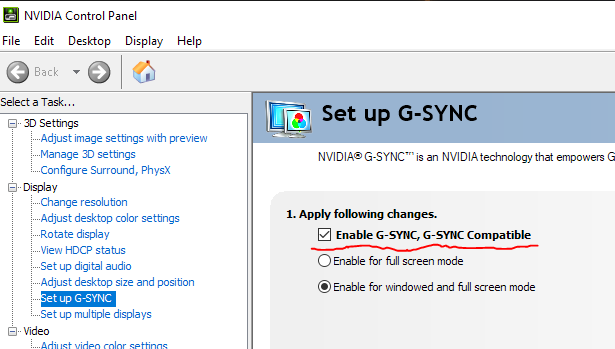
Obviously, this isn't the greatest solution. Uninstalling my Nvidia graphics driver and downgrading it back to version 546.29 allowed me to play with G-SYNC again.
Hopefully this helps.(0)
-
12-23-2023 08:55 AM #8Player
- Join Date
- Dec 2013
- Posts
- 9
- Character
- Zehrymm Skyursyn
- World
- Ultros
- Main Class
- Lancer Lv 71
I wanted to follow up on your post with more troubleshooting of my own. I thought KB5033375 had fixed it for me. I played for two days with no crashes but then they came roaring back. Tried a few more things but nothing that was really making sense before I finally tried what I think is the dumbest option ever.
I went into my BIOS and I disabled speed step and hyperthreading. Since I did that I haven't had a single issue with crashing. I need to do some more testing with turning on one and doing more testing but for now I'm leaving them off just so I can play and see if I can get a week without any crashes.
Disabling speed step somewhat makes sense to me because if FFXIV is so prone to OC as everyone says, why wouldn't it also struggle with changing CPU speeds? It's just a theory right now but its one that has let me play again. Good luck on your troubleshooting.(0)
-
01-03-2024 08:14 AM #9Player
- Join Date
- Mar 2015
- Location
- Ul'Dah
- Posts
- 5
- Character
- Yesurya Yahari
- World
- Faerie
- Main Class
- Sage Lv 90
I played a good amount yesterday without any errors. I lowered the core clock on my gpu on MSI afterburner just a bit and it seems to be doing something. Which seems weird but if it works.
I use a asus rog strix z790-E as my motherboard.(2)
-
01-10-2024 11:01 PM #10
Good morning! Thank you for posting in the Final Fantasy XIV Technical Support Forums.
I am glad to hear that are you are no longer experiencing this issue. If you have any more questions or concerns, please make a new thread in the technical support forums.
This thread will be moved to "Closed Concerns”. Thank you once more for visiting the Final Fantasy XIV Technical Support Forums!(0)
 Reply With Quote


