


No luck for me. Running a 285 with latest beta drivers and only ever keep it in full screen, never borderless or windowed, and I still crash anywhere from 5-15 minutes when it's in DX11.
Originally Posted by Mieck

Thread: DX11 Crashing?
-
06-27-2015 04:13 AM #51Player
- Join Date
- Jun 2015
- Posts
- 1
- Character
- Ryujin Amaterasu
- World
- Gilgamesh
- Main Class
- Ninja Lv 51
(0)
-
06-28-2015 12:11 AM #52Player

- Join Date
- Sep 2013
- Posts
- 23
- Character
- Zenneth Zero
- World
- Hyperion
- Main Class
- Lancer Lv 34
Crashing at very specific area in Coerthas Western Highlands in dx11
https://c1.staticflickr.com/1/427/19...eabdb71d_z.jpg
Coordinates in the pic is 9:15
Just some info:
windows 7 64 bit
i5 proc first gen
ATI Radeon 6800
Software wise I run a very minimalist setup, I only Microsoft Security Essentials and the core system applications
I leave my machine overnight sometimes and never crashes then. I was playing 2 hrs when I started crashing when entering that circled area on the map.
I was also crashing in that area way before I got the main story line quest too.
Update: Seems like almost any lake area I'll eventually crash but the circled is particularly bad(0)Last edited by Metatime; 06-28-2015 at 08:37 AM.
-
06-29-2015 01:42 AM #53Player

- Join Date
- Mar 2011
- Location
- Limsa
- Posts
- 939
- Character
- Drako Lombardi
- World
- Balmung
- Main Class
- Dark Knight Lv 60
OK reporting back. I haven't had a single crash with DX9 besides the unrelated issue with exiting the game. I turned DX11 on and not 30 mins after, I queued, and crashed upon loading into the dungeon. What really baffles me is my wifes PC is also a AMD GFX using DX11 and she hasn't had a single crash what so ever. Here's our Specs.
Mine(the one that crashes randomly during loading, or when opening UI elements):
OS:Windows 7 64-bit
Mobo:Biostar TA990FXE
CPU:AMD 8150 8-core ~3.6GHz(not OC)
GPU:AMD R9 290X 4GB (Driver Catalyst 14.12)
RAM:16GB
Hers(0 issues sense launch for no identifiable reason)
OS: Windows 7 64-bit
Mobo:ASUS M4A79XTD
CPU:AMD Phenom II 4-Core 965 ~3.4GHz
GPU:AMD HD6970 2GB (Driver Catalyst 14.12)
Mem: 8GB
Just for experimental sake I've adjusted my GFX settings to be exactly how hers is setup on the game. Our AMD catalyst settings are identical. What is so confusing is this issue is happening to both AMD and Nvidia users, there's got to be some kind of connection. You guys that are crashing at random times, with the loading and UI, please post your full specs. Maybe we can find some kind of common denominator.
Edit: Even though our GFX settings in the game, and in the Catalyst Control Center are identical. I still crash periodically, I can't really put my finger on it. I'll check out Tawms suggestion, but sense my settings are the same as my wifes, there clearly must be some other issue here.(1)Last edited by Drako; 06-30-2015 at 12:09 AM.
-
06-29-2015 02:04 AM #54Player

- Join Date
- Sep 2013
- Posts
- 40
- Character
- Judeau Laran
- World
- Odin
- Main Class
- White Mage Lv 70
This has probably been pointed out already, but the cause is Tessellation. At least for me, if not set to Normal, it crashes the game eventually.
I used to crash once every hour or so with every DX11 feature enabled, until I started disabling them one by one. Had a 6 hour session yesterday with everything but Tessellation maxed out, and I didn't crash once. This is on a GTX 780 TI with the latest official NVIDIA drivers as of today.(0)
-
06-29-2015 02:21 AM #55Player
- Join Date
- Mar 2011
- Location
- Ul'dah
- Posts
- 252
- Character
- Mieck Corcoczeck
- World
- Ragnarok
- Main Class
- Dark Knight Lv 100
So, the Full Screen fix didn't work for long. I've been struggling on for a few days but the crashes seem very random, until today.
Spoilers sort of follow, but they're required to describe where the game crashed.
I was doing the quest "Ancient Goblin Secret" in Idyllshire / The Dravanian Hinterlands. In the final cutscene under the bridge, my client crashed three times in a row at the exact same point.
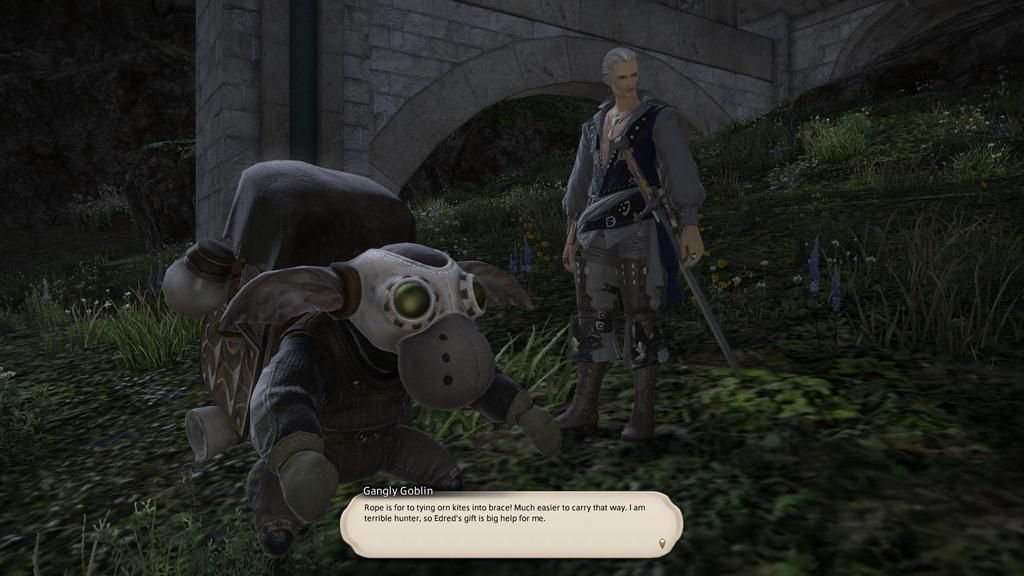 This is where the crash happened.
I reset my machine after every one, but this is the first time I've ever had the client crash repeatedly at the same point. Maybe it's enough to say that some call of the graphics driver is being made here that is causing the crash?
Event log report;
DXDIAG OutputFaulting application name: ffxiv_dx11.exe, version: 1.0.0.0, time stamp: 0x5589c1ae
Faulting module name: ffxiv_dx11.exe, version: 1.0.0.0, time stamp: 0x5589c1ae
Exception code: 0xc0000005
Fault offset: 0x0000000000145a31
Faulting process ID: 0x1570
Faulting application start time: 0x01d0b1acd19ca404
Faulting application path: C:\Games\SquareEnix\FINAL FANTASY XIV - A Realm Reborn\game\ffxiv_dx11.exe
Faulting module path: C:\Games\SquareEnix\FINAL FANTASY XIV - A Realm Reborn\game\ffxiv_dx11.exe
Report ID: 9ee0ae26-1db0-11e5-835e-8086f2c9335c
Faulting package full name:
Faulting package-relative application ID:
------------------
System Information
------------------
Time of this report: 6/28/2015, 18:09:11
Machine name: **********
Operating System: Windows 8.1 64-bit (6.3, Build 9600) (9600.winblue_r9.150322-1500)
Language: English (Regional Setting: English)
System Manufacturer: Gigabyte Technology Co., Ltd.
System Model: Z97N-WIFI
BIOS: BIOS Date: 05/30/14 14:12:00 Ver: 04.06.05
Processor: Intel(R) Core(TM) i7-4790K CPU @ 4.00GHz (8 CPUs), ~4.0GHz
Memory: 16384MB RAM
Available OS Memory: 16246MB RAM
Page File: 3525MB used, 12720MB available
Windows Dir: C:\Windows
DirectX Version: DirectX 11
DX Setup Parameters: Not found
User DPI Setting: Using System DPI
System DPI Setting: 96 DPI (100 percent)
DWM DPI Scaling: Disabled
DxDiag Version: 6.03.9600.17415 64bit Unicode
------------
DxDiag Notes
------------
Display Tab 1: The file aticfx64.dll,aticfx64.dll,aticfx64.dll,aticfx32,aticfx32,aticfx32,atiumd64.dll,atidxx64.dll,atidxx64.dll,atiumdag,atidxx32,atidxx32,atiumdva,atiumd6a.cap,atitmm64.dll is not digitally signed, which means that it has not been tested by Microsoft's Windows Hardware Quality Labs (WHQL). You may be able to get a WHQL logo'd driver from the hardware manufacturer.
Sound Tab 1: No problems found.
Sound Tab 2: No problems found.
Sound Tab 3: No problems found.
Input Tab: No problems found.
--------------------
DirectX Debug Levels
--------------------
Direct3D: 0/4 (retail)
DirectDraw: 0/4 (retail)
DirectInput: 0/5 (retail)
DirectMusic: 0/5 (retail)
DirectPlay: 0/9 (retail)
DirectSound: 0/5 (retail)
DirectShow: 0/6 (retail)
---------------
Display Devices
---------------
Card name: AMD Radeon R9 200 Series
Manufacturer: Advanced Micro Devices, Inc.
Chip type: AMD Radeon Graphics Processor (0x6939)
DAC type: Internal DAC(400MHz)
Device Type: Full Device
Device Key: Enum\PCI\VEN_1002&DEV_6939&SUBSYS_92851682&REV_00
Display Memory: 5861 MB
Dedicated Memory: 2021 MB
Shared Memory: 3840 MB
Current Mode: 1920 x 1080 (32 bit) (60Hz)
Monitor Name: HP x2301 Micro Thin Monitor
Monitor Model: HP x2301
Monitor Id: HWP2972
Native Mode: 1920 x 1080(p) (60.000Hz)
Output Type: DVI
Driver Name: aticfx64.dll,aticfx64.dll,aticfx64.dll,aticfx32,aticfx32,aticfx32,atiumd64.dll,atidxx64.dll,atidxx64.dll,atiumdag,atidxx32,atidxx32,atiumdva,atiumd6a.cap,atitmm64.dll
Driver File Version: 8.17.0010.1333 (English)
Driver Version: 14.502.1014.1001
DDI Version: 11.1
Feature Levels: 11.1,11.0,10.1,10.0,9.3,9.2,9.1
Driver Model: WDDM 1.3
Graphics Preemption: DMA
Compute Preemption: DMA
Miracast: Not Supported by Graphics driver
Hybrid Graphics GPU: Not Supported
Power P-states: Not Supported
Driver Attributes: Final Retail
Driver Date/Size: 6/20/2015 15:41:13, 1359752 bytes
WHQL Logo'd: No
WHQL Date Stamp: None
Device Identifier: {D7B71EE2-2A79-11CF-0770-8FB2BEC2C535}
Vendor ID: 0x1002
Device ID: 0x6939
SubSys ID: 0x92851682
Revision ID: 0x0000
Driver Strong Name: oem97.inf:cb0ae414c2719606:ati2mtag_Tonga:14.502.1014.1001 ci\ven_1002&dev_6939&rev_00
Rank Of Driver: 00DA2000
Video Accel: ModeMPEG2_A ModeMPEG2_C ModeVC1_C ModeWMV9_C
DXVA2 Modes: DXVA2_ModeMPEG2_VLD DXVA2_ModeMPEG2_IDCT DXVA2_ModeH264_VLD_NoFGT DXVA2_ModeVC1_VLD DXVA2_ModeVC1_IDCT DXVA2_ModeWMV9_IDCT
Deinterlace Caps: {6E8329FF-B642-418B-BCF0-BCB6591E255F}: Format(In/Out)=(YUY2,YUY2) Frames(Prev/Fwd/Back)=(0,0,1) Caps=VideoProcess_YUV2RGB VideoProcess_StretchX VideoProcess_StretchY DeinterlaceTech_PixelAdaptive
{335AA36E-7884-43A4-9C91-7F87FAF3E37E}: Format(In/Out)=(YUY2,YUY2) Frames(Prev/Fwd/Back)=(0,0,0) Caps=VideoProcess_YUV2RGB VideoProcess_StretchX VideoProcess_StretchY DeinterlaceTech_BOBVerticalStretch
{5A54A0C9-C7EC-4BD9-8EDE-F3C75DC4393B}: Format(In/Out)=(YUY2,YUY2) Frames(Prev/Fwd/Back)=(0,0,0) Caps=VideoProcess_YUV2RGB VideoProcess_StretchX VideoProcess_StretchY
{6E8329FF-B642-418B-BCF0-BCB6591E255F}: Format(In/Out)=(UYVY,UYVY) Frames(Prev/Fwd/Back)=(0,0,1) Caps=VideoProcess_YUV2RGB VideoProcess_StretchX VideoProcess_StretchY DeinterlaceTech_PixelAdaptive
{335AA36E-7884-43A4-9C91-7F87FAF3E37E}: Format(In/Out)=(UYVY,UYVY) Frames(Prev/Fwd/Back)=(0,0,0) Caps=VideoProcess_YUV2RGB VideoProcess_StretchX VideoProcess_StretchY DeinterlaceTech_BOBVerticalStretch
{5A54A0C9-C7EC-4BD9-8EDE-F3C75DC4393B}: Format(In/Out)=(UYVY,UYVY) Frames(Prev/Fwd/Back)=(0,0,0) Caps=VideoProcess_YUV2RGB VideoProcess_StretchX VideoProcess_StretchY
{5A54A0C9-C7EC-4BD9-8EDE-F3C75DC4393B}: Format(In/Out)=(YV12,0x32315659) Frames(Prev/Fwd/Back)=(0,0,0) Caps=
{A491560E-FFE4-4202-9B1D-2DCD004EB9E3}: Format(In/Out)=(NV12,0x3231564e) Frames(Prev/Fwd/Back)=(0,0,2) Caps=VideoProcess_YUV2RGB VideoProcess_StretchX VideoProcess_StretchY DeinterlaceTech_PixelAdaptive
{3C5323C1-6FB7-44F5-9081-056BF2EE449D}: Format(In/Out)=(NV12,0x3231564e) Frames(Prev/Fwd/Back)=(0,0,2) Caps=VideoProcess_YUV2RGB VideoProcess_StretchX VideoProcess_StretchY DeinterlaceTech_PixelAdaptive
{552C0DAD-CCBC-420B-83C8-74943CF9F1A6}: Format(In/Out)=(NV12,0x3231564e) Frames(Prev/Fwd/Back)=(0,0,2) Caps=VideoProcess_YUV2RGB VideoProcess_StretchX VideoProcess_StretchY DeinterlaceTech_PixelAdaptive
{6E8329FF-B642-418B-BCF0-BCB6591E255F}: Format(In/Out)=(NV12,0x3231564e) Frames(Prev/Fwd/Back)=(0,0,1) Caps=VideoProcess_YUV2RGB VideoProcess_StretchX VideoProcess_StretchY DeinterlaceTech_PixelAdaptive
{335AA36E-7884-43A4-9C91-7F87FAF3E37E}: Format(In/Out)=(NV12,0x3231564e) Frames(Prev/Fwd/Back)=(0,0,0) Caps=VideoProcess_YUV2RGB VideoProcess_StretchX VideoProcess_StretchY DeinterlaceTech_BOBVerticalStretch
{5A54A0C9-C7EC-4BD9-8EDE-F3C75DC4393B}: Format(In/Out)=(NV12,0x3231564e) Frames(Prev/Fwd/Back)=(0,0,0) Caps=VideoProcess_YUV2RGB VideoProcess_StretchX VideoProcess_StretchY
{5A54A0C9-C7EC-4BD9-8EDE-F3C75DC4393B}: Format(In/Out)=(IMC1,UNKNOWN) Frames(Prev/Fwd/Back)=(0,0,0) Caps=
{5A54A0C9-C7EC-4BD9-8EDE-F3C75DC4393B}: Format(In/Out)=(IMC2,UNKNOWN) Frames(Prev/Fwd/Back)=(0,0,0) Caps=
{5A54A0C9-C7EC-4BD9-8EDE-F3C75DC4393B}: Format(In/Out)=(IMC3,UNKNOWN) Frames(Prev/Fwd/Back)=(0,0,0) Caps=
{5A54A0C9-C7EC-4BD9-8EDE-F3C75DC4393B}: Format(In/Out)=(IMC4,UNKNOWN) Frames(Prev/Fwd/Back)=(0,0,0) Caps=
{5A54A0C9-C7EC-4BD9-8EDE-F3C75DC4393B}: Format(In/Out)=(S340,UNKNOWN) Frames(Prev/Fwd/Back)=(0,0,0) Caps=
{5A54A0C9-C7EC-4BD9-8EDE-F3C75DC4393B}: Format(In/Out)=(S342,UNKNOWN) Frames(Prev/Fwd/Back)=(0,0,0) Caps=
D3D9 Overlay: Not Supported
DXVA-HD: Not Supported
DDraw Status: Enabled
D3D Status: Enabled
AGP Status: Enabled(0)
-
06-29-2015 10:16 PM #56Player

- Join Date
- Sep 2013
- Location
- Gridania
- Posts
- 234
- Character
- Frost Trunks
- World
- Leviathan
- Main Class
- Lancer Lv 80
Hmmm. It's unfortunate that people are still having issues with this even in full screen mode.
I had more success over the weekend. I did not play as much as I would have liked. I had my power out for 16 hours. I did play for a few hours Friday and Sunday evening, in FS, with 0 crashes.
Does anyone want to try the Tessellation setting change (per Tawm) to see if that helps?(0)
-
06-30-2015 04:55 AM #57Player

- Join Date
- Sep 2013
- Location
- Ul'dah
- Posts
- 23
- Character
- Van Burace
- World
- Hyperion
- Main Class
- Thaumaturge Lv 52
I’m having an issue with a Radeon R9 290 (15.6 beta drivers), where when I zone the game locks up pretty hardcore when running DX11 mode. The freezing is random, where sometimes it’s fine, but sometimes it’s impossible to even force quit the game because Task Manager won’t appear over it. I do run DisplayFusion but I haven’t tried disabling it yet. Windows 8.1. Most common zones it happens in are the Limsa Lower Decks, and the Foundation.
Switched back to DX9 mode and everything is okay. Still getting the occasional pause and microstutter, but I believe that's just a driver issue.
Switched back to my old GTX770 (with 353.30 WHQL driver), and I’m still experiencing the same style of crash. Switched back to DX9 and everything is stable.(0)
-
06-30-2015 04:58 AM #58Player
- Join Date
- Jan 2014
- Posts
- 901
- Character
- Final Spark
- World
- Balmung
- Main Class
- Bard Lv 90
Not sure if this is related, but at random times my whole GPU freezes, forcing me to shut down my computer manually (thank god I have a reset button on the side).
I honestly think it was a driver issue with the latest driver.
I've rolled back to the GTA V release driver and haven't had any problems since then. :v.(0)
-
06-30-2015 05:03 AM #59Player

- Join Date
- Sep 2013
- Posts
- 285
- Character
- Onywen Fraelia
- World
- Ragnarok
- Main Class
- Arcanist Lv 90
FFXIV randomly crashes at least once a day (usually 2-3). Just shuts down without any error. My computer has also black screened twice, but unsure if that was caused by the game.
W7 U64-bit
AMD 7950
i7 3770k
8GB RAM(0)
-
06-30-2015 09:31 AM #60Player

- Join Date
- Sep 2013
- Posts
- 4
- Character
- Slaughter House
- World
- Cactuar
- Main Class
- Gladiator Lv 36
I was suffering with crashes non-stop while running the game in DX11. I have GTX 580 in SLI running on 353.30 Nvidia drivers.
I can get the game running stable by either running non-SLI in DX11 or running SLI in DX9.(0)
 Reply With Quote


 This is where the crash happened.


