

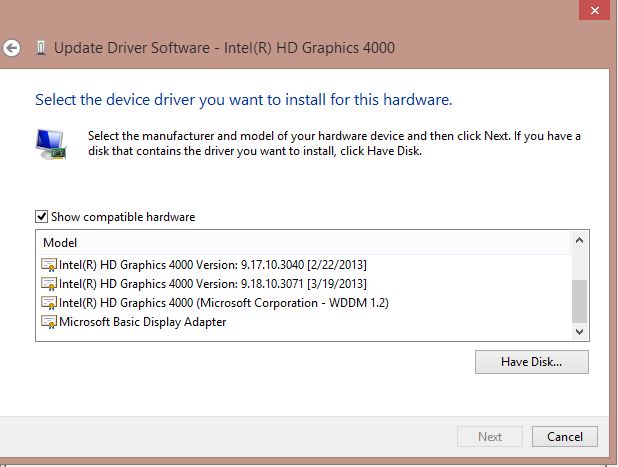
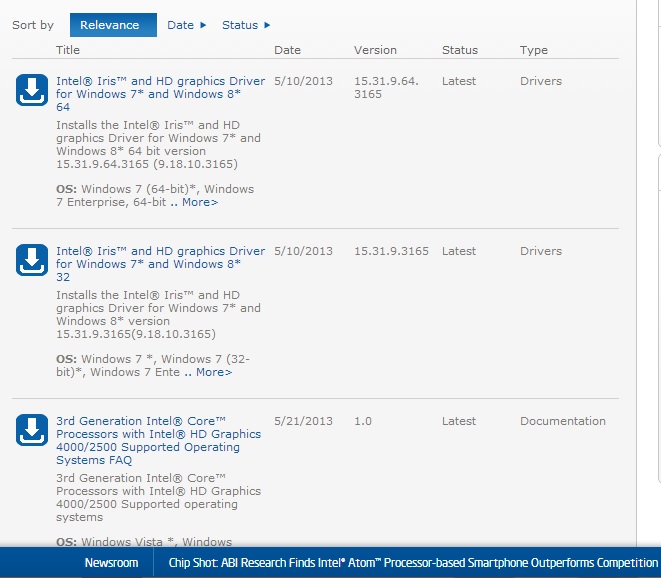
Thank you very much for the fix! But my point was we shouldn't have to go through all that; Issues like this should be worked out between the gaming and GPU companies. But all they do is ping-pong blame.

Originally Posted by Leatherman

- Forum Top
- English Forums
- Technical Support
- Resolved Issues
- Intel HD Graphics Display Driver
Results -9 to 0 of 14
Thread: Intel HD Graphics Display Driver
Threaded View
-
06-29-2013 10:21 AM #10Player


- Join Date
- Apr 2012
- Posts
- 7
- Character
- Gistukul
- World
- Leviathan
- Main Class
- PLD Lv 99
(0)
In case there was still any doubt~!

 :
:

 Reply With Quote
Quick Navigation
Resolved Issues
Top
- Forums
- Japanese Forums
- インフォメーション
- テクニカルサポート
- 不具合報告
- アップデート
- ゲームシステム
- 戦術
- ジョブ
- ウェブサイトフィードバック
- 雑談
- テストサーバー
- コミュニティイベント
- 開催中
- 終了
- すべての冒険者さんにありがとうキャンペーン2022
- カボチャを探そう!スクリーンショットキャンペーン
- ヴァナに行こう!ウマウマ育成キャンペーン
- 真夏に勝てる身体作り!育成応援キャンペーン
- 春寒料峭でも元気に育成キャンペーン (2021年2月)
- 寒さに負けるな!冬の育成応援キャンペーン(2020年12月)
- シールドデザインコンテスト2020
- 今年もアツい!真夏の育成応援キャンペーン(2020年8月)
- ヴァナ・ディールで過ごそう!育成応援キャンペーン
- バトルコンテンツ&育成応援キャンペーン(2020年2月)
- 夏祭りスクリーンショットキャンペーン
- 大盤振る舞い!倍々モリモリキャンペーン
- すべての冒険者さんにありがとうキャンペーン(2019年8月)
- すべての冒険者さんにありがとうキャンペーン2019
- 推しNPCスクリーンショットキャンペーン
- ヴァナあるあるスクリーンショットキャンペーン
- すべての冒険者さんにありがとうキャンペーン 2018
- 「復帰者全力サポートキャンペーン」第3弾
- 「復帰者全力サポートキャンペーン」第2弾
- ハロウィンスクリーンショットキャンペーン
- FINAL FANTASY XI Reddit公開Q&A
- 「復帰者大応援キャンペーン」について
- 「復帰者全力サポートキャンペーン」第1弾
- ミーブル・バローズキャンペーンのお知らせ
- 短冊に願いをこめて 2014
- 短冊に願いをこめて
- NPC人気投票
- あなたの食べたいヴァナ・ディール スィーツ募集
- シールドデザインコンテスト
- ヴァナ・ディールでの思い出を語ろう!
- 第1回 キャラ弁コンテスト
- アドゥリンの魔境 ~風水士、魔導剣士たち~
- アドゥリンの魔境 ~開拓者たち~
- 創作タマゴコンテスト
- ミーブル・バローズ スペシャルアイテム登場!
- 第1回モグハウスデコレーションコンテスト
- ヴァナ・ディール川柳
- 第0.5回 ハロウィンスィーツコンテスト
- Trick or Tweet !
- チゴーでGO!
- 第0回 モグハウスデコレーションコンテスト
- テストサーバープレイ会「ヒロインズタワー」
- ヴァナ★フェス2012
- 創作タマゴコンテスト (JP)
- トレジャーハント~白いタマゴたち~ (JP)
- English Forums
- Information
- Technical Support
- In-Game Bugs
- Updates
- Gameplay
- Tactics
- Jobs
- Feedback
- Community
- Test Server
- Community Events
- Current Events
- Past Events
- Cloud of Darkness Screenshot Campaign (January 2025)
- Ark Angel Aesthetics Screenshot Campaign (December 2024)
- My Mog House Screenshot Campaign
- Vana'diel Cherry Blossom Screenshot Campaign 2023
- Pumpkin Hunt Screenshot Campaign 2022
- Blazing Buffaloes Screenshot Campaign
- Celestial Nights Screenshot Campaign
- Fun in the Sun Campaign
- 20th Vana’versary Development Team Reddit AMA
- Adventurer Appreciation Campaign 2022
- Vana'diel Cherry Blossom Screenshot Campaign
- Pumpkin Hunt Screenshot Campaign
- My Vana’diel Banquet Campaign
- Bulk Up This Summer Campaign
- Experience Vana’diel to the Fullest Campaign
- Midwinter Succor Campaign (February 2021)
- Matsui-P and Me Screenshot Sweepstakes
- Keeping Warm in Winter Campaign(December 2020)
- Shield Design Contest 2020
- Midsummer’s Night Bounty Campaign (August 2020)
- Relaxing in Vana’diel Campaign
- Fan Gathering 2020 at PAX East
- Boost & Battle Campaign (February 2020)
- Vana’diel MonSTAR Screenshot Campaign
- Autumn Double the Fun Campaign
- Watermelon Mandragora Fan Art Contest (NA)
- One in a Melon Screenshot Campaign
- Adventurer Appreciation Campaign (August 2019)
- Welcome Back to Vana’diel Screenshot Campaign
- Adventurer Appreciation Campaign 2019
- All Dolled Up Screenshot Campaign 2019
- My Favorite NPC Screenshot Campaign
- Reunion in Vana’diel Screenshot Campaign
- Surfin’ Vana’diel 2018 Screenshot Campaign
- Only in Vana’diel Screenshot Campaign
- Adventurer Gratitude Campaign
- Adventurer Appreciation Campaign 2018
- Destination Vana’diel Screenshot Campaign
- All Dolled Up Screenshot Campaign
- Winter Wonder Mog House Campaign
- Returnee Support Campaign Phase Three
- Returnee Support Campaign Phase Two
- Spooktacular Harvest Festival Celebration
- Recollections of Vana’diel
- Returnee Support Campaign Phase One
- FINAL FANTASY XI Reddit AMA
- The Grand Returnee Fiesta
- Meeble Burrows Campaign Tunnels into Existence!
- Summertime Comic Creation Contest (NA)
- NPC popularity contest
- XI Years of FINAL FANTASY XI (NA)
- Shield Design Contest
- Rune Fencers & Geomancers
- Springtime Egg Decoration Contest
- Unearth More Treasures with a New Seekers of Adoulin Celebratory Event!
- A Vana’dielian Hunt (NA)
- Valentione's Day Mog House Decoration Contest (NA)
- Valentione's Day Mog House Decoration Contest (EU)
- A Beast for the Feast (NA)
- Mog House Decoration Contest (NA)
- VanaFest Golden Gobbiebag Giveaway
- VanaFest 2012
- Mog House Decoration Contest (EU)
- The Heroines' Holdfast Test Server Play Event (NA)
- Where in Vana'diel is the Community Team? (NA)
- The Most Interesting Moogle in Vana'diel Contest (NA)
- Valentione’s Screenshot Contest (NA)
- Moogle's Law Contest (NA)
- Screenshot Caption Contest (NA)
- Screenshot Caption Contest (EU)
- Valentione’s Screenshot Contest (EU)
- Forum Archive
- Forums français
- Informations
- Assistance technique
- Problèmes dans le jeu
- Problèmes dans le jeu
- Problèmes résolus
- Problèmes confirmés
- Rapports de problèmes incomplets
- Problèmes impossibles à reproduire
- Problèmes confirmés/Correctif prévu
- Problèmes corrigés
- Fonctionne comme prévu
- Rapports de problèmes déjà signalés
- Pas un problème dans le jeu
- Rapports de problèmes précédents
- Développement
- Système de jeu
- Rôles des jobs
- Jobs
- Avis et retours
- Discussion
- Serveur de test
- Evénements organisés par l'équipe communautaire
- Evénements en cours
- Evénements passés
- La campagne "Terrier des meebles" arrive à grands pas !
- Election des PNJ les plus populaires de Vana’diel
- Concours de création de bouclier
- Épéistes runiques & Géomanciens
- Concours : « Décoration d’Œufs de Printemps »
- Les Meebles troquent des objets spéciaux pour célébrer « Explorateurs d'Adoulin » !
- Concours de décoration de Maison Mog de la Saint Valentione
- Concours de décoration de maison Mog FINAL FANTASY XI
- VanaFest 2012 (FR)
- CONCOURS DE “LÉGENDE” D’IMAGE
- Deutsches Forum
- Ankündigungen
- Technischer Support
- Fehler im Spiel
- Update
- Spielsystem
- Taktiken
- Jobs
- Feedback
- Diskussionen
- Testserver
- Community-Veranstaltungen
- Aktuelle Veranstaltungen
- Vergangene Veranstaltungen
- Ankündigung der Kampagne in den Meeble-Bauten
- NPC-Beliebtheitsumfrage
- Schild-Designwettbewerb
- Runenfechter und Geomanten
- Frühjahrs-Ei-Dekorations-Wettbewerb
- Neue Items in den Meeble-Bauten zur Einstimmung auf „Im Banne Adoulins“!
- Mog-Haus-Dekorationswettbewerb zum Valentionstag
- FINAL FANTASY XI Mog-Haus-Dekorations-Wettbewerb
- VanaFest 2012 (DE)
- Screenshot Caption-Wettbewerb
- Forums français
«
Previous Thread
|
Next Thread
»

